MyTimeslots
MyTimeslots
Please note: MyTimeslots is only available for users with the ‘Terminal’ permission enabled. Your company needs a verified EAN number to use MyTimeslots. If no EAN is registered, ask your company administrator to register it. ECT aims to verify an EAN within two working days.
MyTimeslots shows truck visits associated with your company at the Delta and Euromax terminals. You can check each visit’s timeslot, containers and TAR status before the truck arrives.
View your truck visits
Open MyTimeslots and select Delta or Euromax. Use the date field to choose a day, from today up to two working days ahead. Timeslots open two working days in advance at 09:00.
Each row represents a truck visit. The Timeslot column shows that visit’s time window.
Understand the visit list
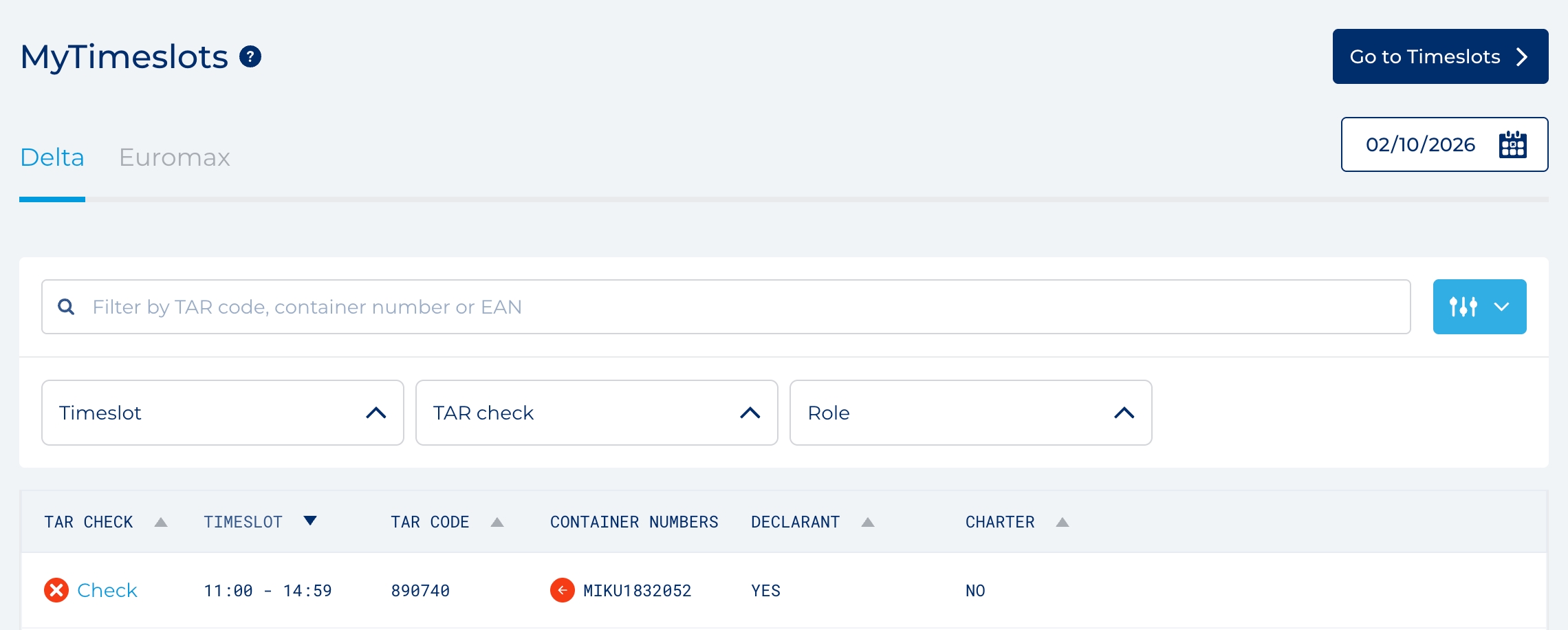
- TAR Check: A check mark means the visit is executable. a cross indicates that the visit has a problem.
- Timeslot: The visit’s time window.
- TAR code: The TAR code for the visit.
- Container numbers: The containers associated with the visit. Hover over an icon to see whether a container is for pickup, dropoff or remains on the truck.
- Declarant and Charter: Yes means your company has that role in the visit. Otherwise, the column shows No, with the other party’s EAN when available.
Find a visit
Use the search field to filter by TAR code, container number or EAN. You can also filter by Timeslot, TAR check (Executable or Problems), and your company’s Role (Declarant or Charter). Click a sortable column heading to change the order of the results.
Check a TAR code
Click a visit row to open its TAR Result. This shows whether the visit is ready for pickup or dropoff, along with the appointment, company and container details. If the visit is not ready, review the issues shown in the result before proceeding to the terminal.